# 9. Gestión de pedidos de Miravia

<span style="font-size: 11pt; font-family: Jost, sans-serif; background-color: transparent; font-weight: 400; font-style: normal; font-variant: normal; text-decoration: none; vertical-align: baseline; white-space: pre-wrap;">Miravia contempla dos formas de enviar pedidos: **DBM (Delivery by Miravia)** y **DBS (Delivery by seller)**. En el caso de DBM es Miravia quien propone a **GLS como repartidor**, y es el método de envío mayoritario, mientras que DBS se usa en el menor de los casos.</span>

### <span style="font-size: 15pt; font-family: Jost,sans-serif; color: #28897f; background-color: transparent; font-weight: 500; font-style: normal; font-variant: normal; text-decoration: none; vertical-align: baseline; white-space: pre-wrap;">9.1 DBM - Delivery by Miravia</span>

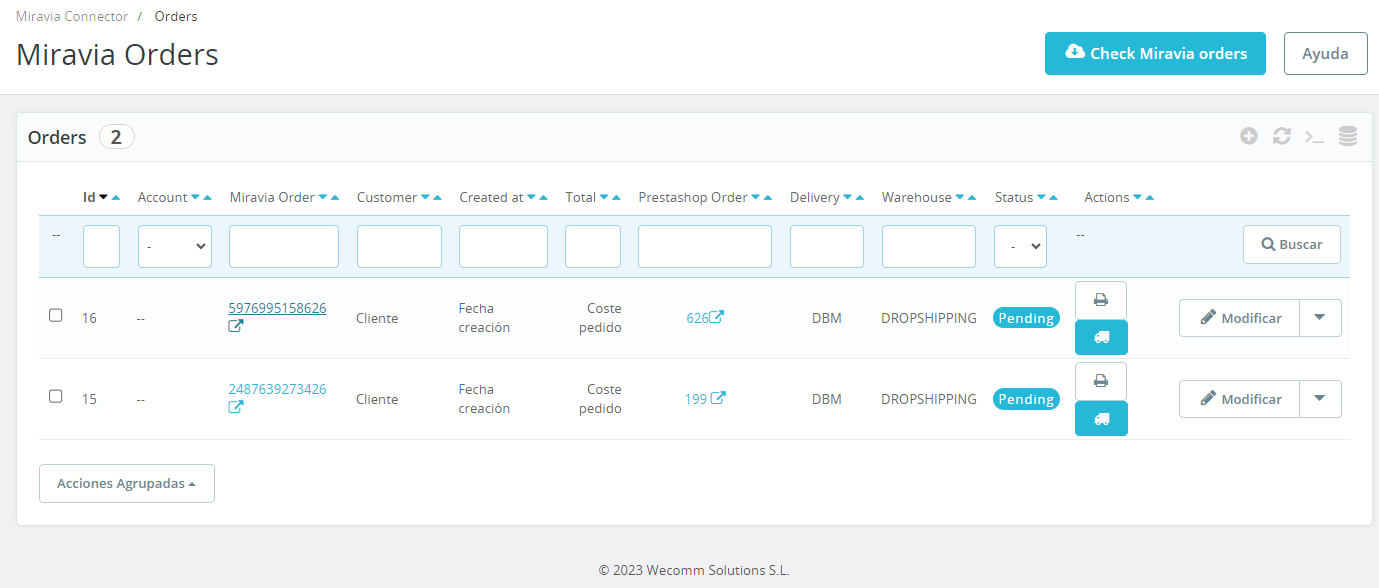
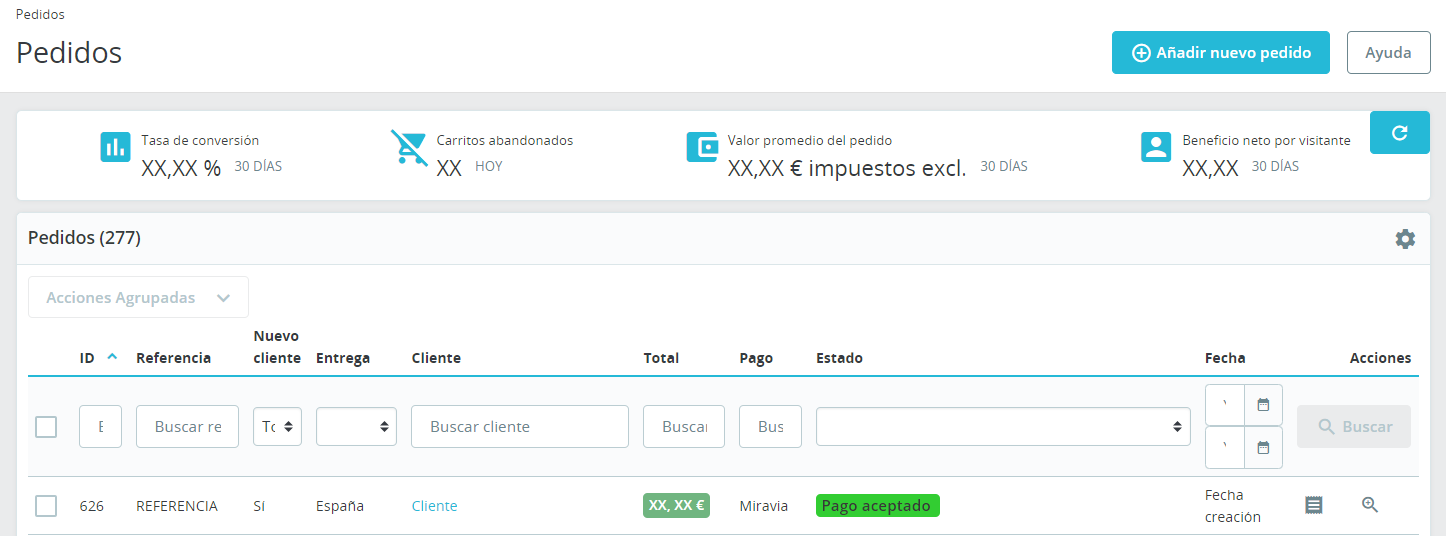
<span style="font-size: 11pt; font-family: Jost, sans-serif; background-color: transparent; font-weight: 400; font-style: normal; font-variant: normal; text-decoration: none; vertical-align: baseline; white-space: pre-wrap;">Detectaremos un nuevo pedido en las notificaciones de PrestaShop (icono de campana de notificación). Podemos localizarlo desde las propias notificaciones, desde la ventana “</span><span style="font-size: 11pt; font-family: Jost, sans-serif; background-color: transparent; font-weight: bold; font-style: normal; font-variant: normal; text-decoration: none; vertical-align: baseline; white-space: pre-wrap;">Orders</span><span style="font-size: 11pt; font-family: Jost, sans-serif; background-color: transparent; font-weight: 400; font-style: normal; font-variant: normal; text-decoration: none; vertical-align: baseline; white-space: pre-wrap;">” en el módulo, y desde la ventana nativa “</span><span style="font-size: 11pt; font-family: Jost, sans-serif; background-color: transparent; font-weight: bold; font-style: normal; font-variant: normal; text-decoration: none; vertical-align: baseline; white-space: pre-wrap;">Pedidos</span><span style="font-size: 11pt; font-family: Jost, sans-serif; background-color: transparent; font-weight: 400; font-style: normal; font-variant: normal; text-decoration: none; vertical-align: baseline; white-space: pre-wrap;">” de PrestaShop.</span>

<span style="font-size: 11pt; font-family: Jost,sans-serif; color: #000000; background-color: transparent; font-weight: 400; font-style: normal; font-variant: normal; text-decoration: none; vertical-align: baseline; white-space: pre-wrap;"><span style="border: 1pt solid #000000; display: inline-block; overflow: hidden; width: 643px; height: 273px;">![Captura de pantalla 2024-07-25 073802.png](https://docs.miravia.wecomm.es/uploads/images/gallery/2024-07/captura-de-pantalla-2024-07-25-073802.png)</span></span>

<span style="font-size: 11pt; font-family: Jost,sans-serif; color: #999999; background-color: transparent; font-weight: 400; font-style: italic; font-variant: normal; text-decoration: none; vertical-align: baseline; white-space: pre-wrap;">Imagen 9.1.01 - Tabla de pedidos del módulo</span>

<span style="font-size: 11pt; font-family: Jost,sans-serif; color: #000000; background-color: transparent; font-weight: 400; font-style: normal; font-variant: normal; text-decoration: none; vertical-align: baseline; white-space: pre-wrap;"><span style="border: 1pt solid #000000; display: inline-block; overflow: hidden; width: 643px; height: 239px;">![Captura de pantalla 2024-07-25 074238.png](https://docs.miravia.wecomm.es/uploads/images/gallery/2024-07/captura-de-pantalla-2024-07-25-074238.png)</span></span>

<span style="font-size: 11pt; font-family: Jost,sans-serif; color: #999999; background-color: transparent; font-weight: 400; font-style: italic; font-variant: normal; text-decoration: none; vertical-align: baseline; white-space: pre-wrap;">Imagen 9.1.02 - Tabla de pedidos de PrestaShop</span>

<span style="font-size: 11pt; font-family: Jost, sans-serif; background-color: transparent; font-weight: 400; font-style: normal; font-variant: normal; text-decoration: none; vertical-align: baseline; white-space: pre-wrap;">Una vez preparado el pedido, observa que desde la tabla de pedidos del módulo de Miravia hay una columna “</span><span style="font-size: 11pt; font-family: Jost, sans-serif; background-color: transparent; font-weight: bold; font-style: normal; font-variant: normal; text-decoration: none; vertical-align: baseline; white-space: pre-wrap;">Actions</span><span style="font-size: 11pt; font-family: Jost, sans-serif; background-color: transparent; font-weight: 400; font-style: normal; font-variant: normal; text-decoration: none; vertical-align: baseline; white-space: pre-wrap;">”. Aquí encontraremos 2 botones, “</span><span style="font-size: 11pt; font-family: Jost, sans-serif; background-color: transparent; font-weight: bold; font-style: normal; font-variant: normal; text-decoration: none; vertical-align: baseline; white-space: pre-wrap;">Print order</span><span style="font-size: 11pt; font-family: Jost, sans-serif; background-color: transparent; font-weight: 400; font-style: normal; font-variant: normal; text-decoration: none; vertical-align: baseline; white-space: pre-wrap;">” y “</span><span style="font-size: 11pt; font-family: Jost, sans-serif; background-color: transparent; font-weight: bold; font-style: normal; font-variant: normal; text-decoration: none; vertical-align: baseline; white-space: pre-wrap;">Pack</span><span style="font-size: 11pt; font-family: Jost, sans-serif; background-color: transparent; font-weight: 400; font-style: normal; font-variant: normal; text-decoration: none; vertical-align: baseline; white-space: pre-wrap;">”, desde donde deberemos, descargar la orden del pedido de Miravia y generar la orden de recogida del repartidor (recordemos que nos encontramos en un envío DBM, por lo que el repartidor será GLS). Una vez empaquetado, estará disponible el botón “</span><span style="font-size: 11pt; font-family: Jost, sans-serif; background-color: transparent; font-weight: bold; font-style: normal; font-variant: normal; text-decoration: none; vertical-align: baseline; white-space: pre-wrap;">Print label</span><span style="font-size: 11pt; font-family: Jost, sans-serif; background-color: transparent; font-weight: 400; font-style: normal; font-variant: normal; text-decoration: none; vertical-align: baseline; white-space: pre-wrap;">” (ver imagen 5.6.01) mediante el cuál imprimiremos la etiqueta del pedido para ponerla en el paquete. Con esto hecho, solo nos queda esperar al repartidor y entregarle el pedido de nuestro cliente.</span>

### <span style="font-size: 15pt; font-family: Jost,sans-serif; color: #28897f; background-color: transparent; font-weight: 500; font-style: normal; font-variant: normal; text-decoration: none; vertical-align: baseline; white-space: pre-wrap;">9.2 DBS - Delivery by Seller</span>

<span style="font-size: 11pt; font-family: Jost, sans-serif; background-color: transparent; font-weight: 400; font-style: normal; font-variant: normal; text-decoration: none; vertical-align: baseline; white-space: pre-wrap;">Es importante resaltar que </span><span style="font-size: 11pt; font-family: Jost, sans-serif; background-color: transparent; font-weight: bold; font-style: normal; font-variant: normal; text-decoration: none; vertical-align: baseline; white-space: pre-wrap;">no todos los vendedores tienen acceso</span><span style="font-size: 11pt; font-family: Jost, sans-serif; background-color: transparent; font-weight: 400; font-style: normal; font-variant: normal; text-decoration: none; vertical-align: baseline; white-space: pre-wrap;"> a usar este método de envío. En primer lugar, debe ser tu </span><span style="font-size: 11pt; font-family: Jost, sans-serif; background-color: transparent; font-weight: bold; font-style: normal; font-variant: normal; text-decoration: none; vertical-align: baseline; white-space: pre-wrap;">account manager</span><span style="font-size: 11pt; font-family: Jost, sans-serif; background-color: transparent; font-weight: 400; font-style: normal; font-variant: normal; text-decoration: none; vertical-align: baseline; white-space: pre-wrap;"> el que </span><span style="font-size: 11pt; font-family: Jost, sans-serif; background-color: transparent; font-weight: bold; font-style: normal; font-variant: normal; text-decoration: none; vertical-align: baseline; white-space: pre-wrap;">solicita internamente</span><span style="font-size: 11pt; font-family: Jost, sans-serif; background-color: transparent; font-weight: 400; font-style: normal; font-variant: normal; text-decoration: none; vertical-align: baseline; white-space: pre-wrap;"> si tu tienda puede hacer uso de DBS.</span><span style="font-size: 11pt; font-family: Jost, sans-serif; background-color: transparent; font-weight: 400; font-style: normal; font-variant: normal; text-decoration: none; vertical-align: baseline; white-space: pre-wrap;">  
</span><span style="font-size: 11pt; font-family: Jost, sans-serif; background-color: transparent; font-weight: 400; font-style: normal; font-variant: normal; text-decoration: none; vertical-align: baseline; white-space: pre-wrap;">  
</span><span style="font-size: 11pt; font-family: Jost, sans-serif; background-color: transparent; font-weight: 400; font-style: normal; font-variant: normal; text-decoration: none; vertical-align: baseline; white-space: pre-wrap;">Si aprueban la solicitud, primero hay que configurar los ajustes necesarios desde el Centro de vendedor (Miravia Seller Center).</span><span style="font-size: 11pt; font-family: Jost,sans-serif; color: #000000; background-color: transparent; font-weight: 400; font-style: normal; font-variant: normal; text-decoration: none; vertical-align: baseline; white-space: pre-wrap;">  
</span><span style="font-size: 11pt; font-family: Jost,sans-serif; color: #000000; background-color: transparent; font-weight: 400; font-style: normal; font-variant: normal; text-decoration: none; vertical-align: baseline; white-space: pre-wrap;">  
</span>*[<span style="font-size: 11pt; font-family: Jost, sans-serif; color: rgb(17, 85, 204); background-color: transparent; font-weight: 400; font-variant: normal; text-decoration: underline; text-decoration-skip-ink: none; vertical-align: baseline; white-space: pre-wrap;">Información sobre el servicio DBS</span>](https://sellercenter.miravia.es/seller/helpcenter/servicio-dbs-informacion-inicial-y-faqs-384.html)*

<span style="font-size: 11pt; font-family: Jost, sans-serif; background-color: transparent; font-weight: 400; font-style: normal; font-variant: normal; text-decoration: none; vertical-align: baseline; white-space: pre-wrap;">Después de configurar tu tienda para poder envíar por tu cuenta, solo faltaría modificar los productos que se vayan a envíar de este modo o añadir nuevos que lo hagan. </span><span style="font-size: 11pt; font-family: Jost, sans-serif; background-color: transparent; font-weight: 400; font-style: normal; font-variant: normal; text-decoration: none; vertical-align: baseline; white-space: pre-wrap;">  
</span><span style="font-size: 11pt; font-family: Jost, sans-serif; background-color: transparent; font-weight: 400; font-style: normal; font-variant: normal; text-decoration: none; vertical-align: baseline; white-space: pre-wrap;">  
</span><span style="font-size: 11pt; font-family: Jost, sans-serif; background-color: transparent; font-weight: 400; font-style: normal; font-variant: normal; text-decoration: none; vertical-align: baseline; white-space: pre-wrap;">A partir de aquí, la gestión del pedido no difiere en esencia de los pedidos DBM.</span>